
Blog

Recent posts
SEARCH RESULTS FOR: Photojunction Retro
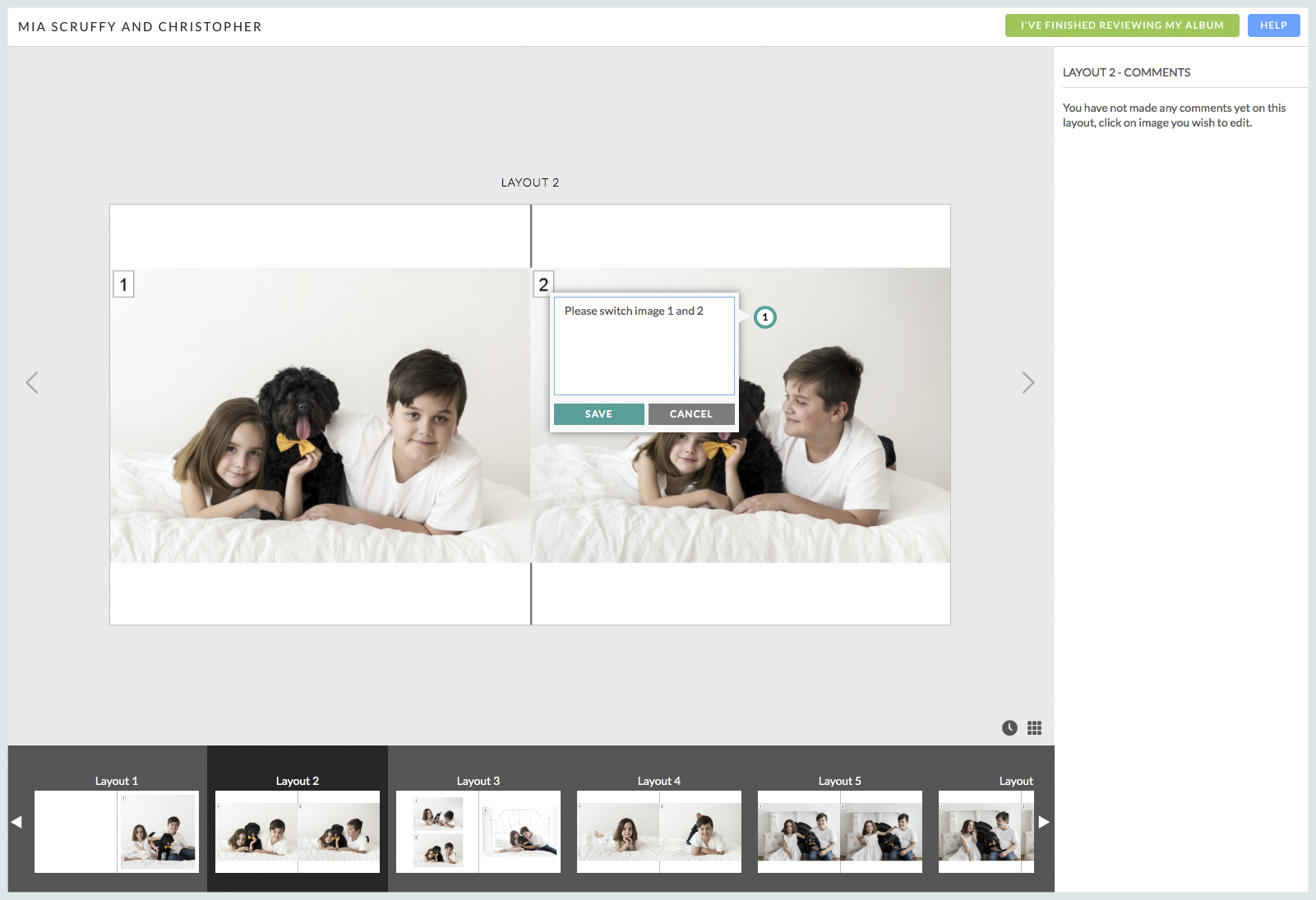
Workspace Album Proofing takes the hassle out of communicating with your clients about their album design. It's a transparent and intuitive way for them to communicate their requests for changes and, when they're ready, to approve the design so you can confirm their album order. New functionality and a simplified interface make Workspace a great solution for managing your Queensberry album designs. And if you're not using Workspace for image hosting and sales you won't need a paid plan to use it. Updates to Comments: Comments are organised To View More >>
This entry was posted in Product Updates by Alexandria Baugh

Modern cameras have sensors capable of producing big, beautiful images. They output files that can make large wall portraits without effort. But what happens when you want the image to be smaller, as in an album? What happens when you downsize a file that's big enough to print a large wall portrait, to create a 3x2" image on a page layout? When you export your images from Photojunction for printing, the software runs an automatic Photoshop process that resizes them and places them into a PSD file. The images are enlarged or reduced, and positioned to suit how you want them to appear on the To View More >>
This entry was posted in by Queensberry Website

Ok it's not the same as getting a new iPhone for Christmas but for the inner Photojunction tech support geek it gets pretty close. Same with all you power users out there I reckon. For me the big one is the first... A new shortcut for choosing standard aperture sizes Instead of selecting an aperture size from the pop-up menu you can now use keyboard shortcuts to increase or decrease an aperture to the next standard size. • For Mac OSX Command+Shift+I and Command+Shift+K • For Windows Control+Shift+I and Control+Shift+K. Next we have not one, not two but three new right-click functions [caption To View More >>
This entry was posted in by Admin

We have released a new Queensberry colour profile to simplify your workflow. Changes to the profile itself are minor. The difference is that until now we've distributed paper-specific colour profiles (Lustre, Metallic etc). That became unwieldy with the introduction of multiple paper stocks for our inkjet and digital offset printers. We now offer a single soft-proofing colour profile, and make adjustments at Queensberry depending on the print and paper options you have requested. WHAT TO DO You can download our profile from this page. With Aperture and Lightroom, simply follow the software's directions To View More >>
This entry was posted in by Admin

It's not until you see the images of your wedding that you realise how incredibly important they are. That's how I felt when I looked at my wedding photos for the first time. I cried! - they were just so much more than what I'd expected, and each one holds a moment of absolute goodness. I'd say it's the same with an album - it's not until you see a book so carefully crafted to document your day that you realise how important this object is that holds these memories. That's what I have in mind when I'm laying out the images for a Musée. Every shot is incredibly special and chosen because the story To View More >>
This entry was posted in by Admin

Thank you to everyone who took part in our Workspace survey and provided insightful comments - some of you went to a lot of trouble over your answers. The development team are only human, so they especially liked your answers to this question: What does Workspace do best? The answer: album proofing, integration with Photojunction, and the sheer number of services it provides in one location. People also liked the "look" of the site and our customer service. It's clear that many people tend to use just one or two of the features (eg album ordering or the shopping cart). If that sounds like you, To View More >>
This entry was posted in by Admin

I was talking to Simon, one of our album layout designers, about how the team were finding the new Workspace album proofing feature. They've been using it with photographers for a few months now and I was keen to get his feedback. What follows is pretty much his response verbatim. "It's working brilliantly! We get to review the studio’s comments alongside the relevant layouts. It’s accurate and clear to follow. "Not having to interpret requests for edits in emails is a real bonus. The integrated communication between the studio, bride and groom, and designer keeps everybody in the loop, and To View More >>
This entry was posted in by Admin

When it comes to design we know that where you start may be not where you end up. That is why in Workspace we have a couple of features to help: First, in Workspace's Albums area you can review the design Queensberry's done, share it with your clients, and pass back any comments and edits to us. Second, you may have a change of heart and want to include additional files that weren't uploaded to Workspace in the initial round. You need to be aware that we are not working directly with your Collections in Workspace. Our designer team use Photojunction instead. When you send us a design order is To View More >>
This entry was posted in by Admin

In part this post is for the locals - us Kiwis and the Aussies from across the ditch. There's more below for those of you currently enjoying Summer… If you love Queensberry's album printing, why use another lab for everything else? We believe in consistency across the board. The same lovely people will do your colour correcting and printing. Depending on what you order, everything will be printed on the same machines. Turn around times are short and you will be talking to the same customer service team. We offer a range of traditional silver halide prints, canvas and fine art inkjet printing, To View More >>
This entry was posted in by Admin

Improved image uploading is probably the biggest deal in this release of Queensberry Workspace, but have a play and judge for yourself. It’s free to try! Uploading Workspace now has six image uploaders for you to choose from – two web-based and four desktop uploaders. Pick one to suit your workflow. The upload window shows them all, including the links and instructions you'll need to use them. You can upload to existing events and collections or create new ones on the fly. One of the web uploaders is slower than the other, but more robust if your internet connection isn't the best. You can To View More >>
This entry was posted in by Admin


